React Native 1 min read

How to generate Google Maps API Key for Mobile App?

Jack Tiong
Jack Tiong
November 26, 2020
  1. First, go to Google Cloud. If you does not have an account, you are required to sign up an account in order to proceed next step. If you already have an account, please sign in to Google Cloud.
  2. After login to Google Cloud, go to Google Cloud Console.
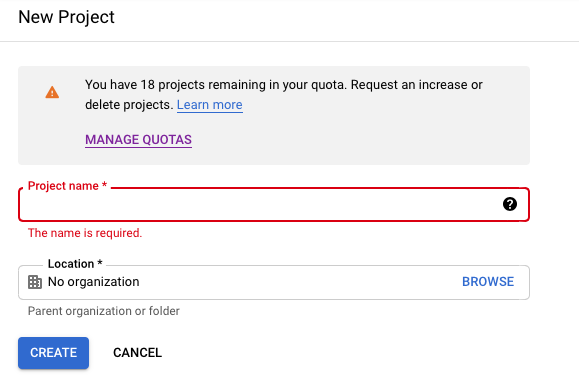
  3. Create a new project via screenshots shown below:

i. Click on current project section to add new project

ii. Click “New Project” button to create new project

iii. Fill your project name and click “CREATE” button at bottom left

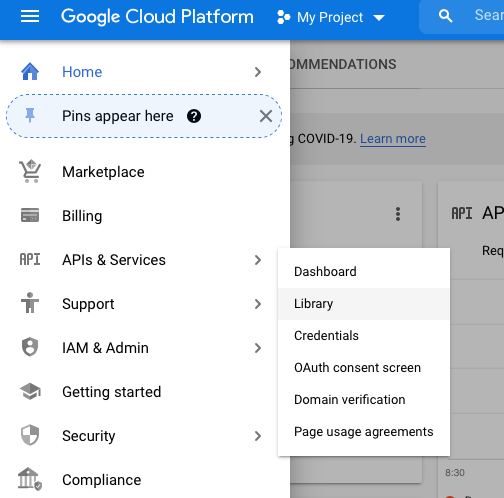
iv. Go to “APIs & Services” > Library to enable libraries required for your project

4. Enable libraries below:

  • Maps SDK For Android
  • Maps SDK for iOS
  • Directions API
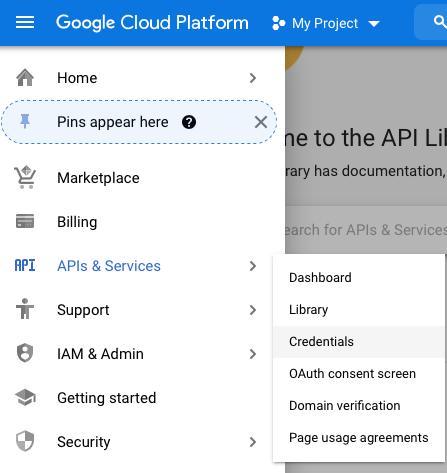
Go to APIs & Services > Credentials to generate API key
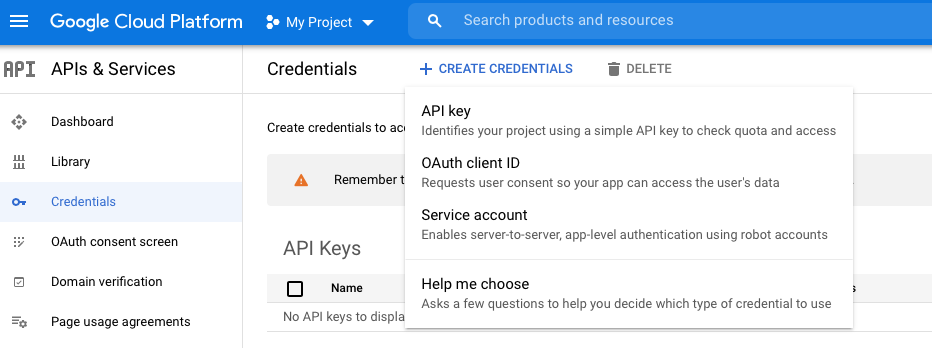
Click “Create Credentials” > API key to generate API key

After you get your API key, remember to restrict it for your own application id only.

Thanks for reading.

Happy Coding!

Speed Up Your Workflow

Want the full source code ready to ship?

Explore our professionally coded React Native & Expo UI Kits, complete with screens, navigators, and theme support.

Browse All Templates

Related Tutorials

View All Tutorials →
React Native

LCRN EP18 – Ecommerce App (Part 1) – Auto Scrolling with Loop | Image Transition Animation

In this episode, we are going to build a pretty cool E-Commerce App. For the first part of this project, we will mainly be focusing on the walkthrough screens and we are going to learn how we can implement auto scrolling images with infinite loop as well as how we can transition multiple images with […]

Mar 07, 2022 Read →
React Native

LCRN EP17 – Online Learning App (Part 1) – React Native UI | Animation | Custom Bottom Tab Navigator

In this episode, we are going to build a beautiful Online Learning App. For the first part of this project, we will mainly be focusing on custom bottom tab navigator as well as some animation concepts. Links Starter TemplateFull Source Code (CLI)Full Source Code (Expo)

Nov 02, 2021 Read →
React Native

LCRN EP16 – Food Delivery App (Part 3) – React Native UI | Swipeable List | Maps | Direction

In this episode, for the 3rd and final part of LCRN16 – Food Delivery App, we are going to build 8 different screens which includes food detail, checkout, cards, maps and etc. Links Starter TemplateFull Source Code (CLI)Full Source Code (Expo)

Sep 27, 2021 Read →